




GoT Minecraft Server Terms of Service
...and Guide to Essentials of Play
Welcome to the Game of Tomes Minecraft server! Here's a few things you'll need to know to play.
A place for GoT players and fans to interact with each other in a mutually-enjoyed social activity
A place for GoT players to flesh out their ideas about settings and structures in Universe of the Game of Tomes "The GoTverse"
A place to roleplay within the GoTverse
All rules are intended to facilitate these three goals.
This server is heavily modded. We'll do our best to help, but we can't guarantee it's going to work on your system. We have no control over that. There isn't a perk to replace it with yet, either, if it doesn't work or if you don't play Minecraft. Sorry!
There is a standard mod pack that you will need to download. See the table in the Sidebar for a list of what's in it:
We can either send you the mod pack, with instructions on how to install it, or you can download the mods yourself with NeoForge/CurseForge. If you do not have the correct modpack, you will not be able to connect with the server, or you may have functionality issues.
Assume you need the latest version of the mod on initial install, unless told otherwise. However, we urge you NOT to update mods unless told to do so! Sometimes updates lead to mods not playing well with others.
Mods are subject to changes and updates, which may or may not be within our control. If it is something we can control, and we got rid of a mod you really liked, message us and we'll see what we can do — but we can't make any guarantees.
The server defaults to Survival mode, but you can request Creative mode from the Ops for big projects (or just if you're afraid of the mobs and we're not doing a server-wide RP of a November war, we don't mind. Everyone should play the game they want to play!)
Unless you tell us otherwise, we assume that everything you are building is intended as part of the GoTverse, which is a co-created shared universe. That means that your work might appear in official GoT Lore, such as in a video or on the website. Using the server means you give us permission to do that.
However, you CAN work on projects that are not intended for the GoTverse, and we will see that those do not make it into Lore! See Building Rules to find out how.
NO GRIEFING. We are not kidding. Do not set out to make life difficult for other players. Leave their building projects alone. Don't steal things out of their chests and desks. Don't blow up their bases. Basically, don't be an a$$hole.
NO HARASSMENT OR BULLYING. Of any kind. Period.
DO NOT FILK WITH THE SERVER. No viruses, no hacking, no DDOS attacks, nothing that might potentially mess with the server and spoil anyone's gameplay.
DO NOT DO ANYTHING ILLEGAL ON THE SERVER. Do I have to actually say that? Please, just don't.
DO NOT GIVE OUT THE IP OF THE SERVER TO ANYONE ELSE. Not even your partner or best friend, please.
Mature content roleplay is allowed, but make sure that everyone involved has given consent. Keep that content out of server chat — do it in a Discord VC or something. Use SecurityCraft Exclusion Modules, or SecurityCraft Allow Modules, to keep players who are minors out of areas devoted to this content (ie. Maybe you're building sexy statues or something — don't do it outside, and lock the door)
There is now a Minecraft role that you can select in the #role-selection channel on the GoT Discord server. Please select this role. This is how we will be sharing important updates and other things you'll need to know.
Here are some known issues and bugs:DO NOT USE THE DIMMABLE ROSE QUARTS LIGHTS from Create More Features! They are unstable and the server WILL crash. Fixing it is a pain. Please just don't. The regular Rose Quartz Lights from Create (not Create More Features!) appear to work fine.
DO NOT USE THE "ANOMALY" BLOCK from Biomes O Plenty (it looks like static in your Inventory) - according to fans, it causes major server lag
As I talk about below, don't use too many SecurityCraft or Create mods in one location. I once crashed the server by having too many Security Cameras and Sentinels at the Warren :D And a morgue with 100 working drawers.
The undead Starbuncle variants appear to burn whenever under the open sky, even at night. They are not "actually" burning unless exposed to sunlight. This is a known bug of the mod, but I'm not complaining because it's useful to help spot them!
Ars Nouveau modAll the tutorials tell you to create the Worn Notebook first. This item's name has been changed to the Tattered Tome, but it works the same way.
Warp Scrolls and Stabilized Warp Scrolls do not work the way they are described in the tutorials. Warp Scrolls can be attuned to a location and they will just teleport you there (and then the scroll will be consumed if you are on Survival.) Stabilized Warp Scrolls create a temporary portal that is 5 by 5 blocks wide (and you need the space for that to manifest!), but the portal then breaks and disappears after a minute or two. However, the scroll is not consumed, even in Survival mode.
Be aware that Starbuncles are supposed to appear in any wooded biome, but they won't appear in the original forests that were spawned by the world, because this mod was not added until later. You may have to search out forests that are farther away. The same holds true of the other "familiar" mobs.
Gravestones modThe mod will create a grave for you that holds all your stuff so you can keep it after death, as described. However, it appears that for some reason, only server ops are able to break the grave, although players are supposed to be able to. So if you die, feel free to ask an op to break your grave for you and retrieve your stuff.
Nature's Compass mod:Several people in the server have complained that this mod does not work. I, too, have searched out biomes with it, only to discover that what they claimed would be a "fungal jungle" or a "glowing grotto" were in the middle of the ocean. This is because when the original world was generated, it was a vanilla generation, and later mods were not yet installed. The origin of the world was around the Warren area, so you may have to go farther out to start your search for better accuracy if it's not a vanilla biome you're looking for. I suggest starting from The Great Library, The Cavern, or some of the more "northern" biome areas, such as the Stuart Lake Power Plant.
Productive Bees modFarmer Bees harvest crops for you. However, they only seem to be able to harvest above ground crops. I have managed to get them to harvest sugar cane and melons and pumpkins to great effect, but they don't seem to be capable of harvesting any grains, leafy crops, or beetroot. It's like they need something you can harvest by smashing. Further, they seem to prefer the grain crops, so you must enclose them with the crops you want them to focus on.
The gene splicing machinery does not appear to be working as described. Instead, create your gene-altering honey treat as described, and then right-click directly on the bee you would like to apply it to.
On the right hand side of your game screen, you will see images of a whole bunch of game blocks. This is JEI (Just Enough Resources) and it's a handy tool to help you figure things out. Left click on one of those icons to find out how to make that thing. Right click on the icon to learn what you can make with it. It will demonstrate the process in graphics, with tabs at the top of the window that are focused on the machine or device that makes it (crafting table, Create crafters, Ars Nouveau Enchanting Apparatus, etc.) It's a good quick guide, although you might have to look things up if they are a bit confusing.
The list is also searchable with the search bar at the bottom of the right hand side of the screen.
A lot of the Create ad-on mods, and mods like Handcrafting and Farmer's Delight, will explain what they do if you hold down the left shift key while hovering your cursor over it in a similar way. They'll usually tell you this when you hover your cursor.
You'll need the latter two for quite some time, and if you're working with those mods, you should probably keep them in a handy inventory. The Animal Dictionary can probably be left in a chest at your base, so you can look up things as you encounter and acquire them.
The Security Craft manual is much less useful, but important as a reference, so I advise you to keep it at your base and only consult it when you need it. As far as I can tell, you have to scroll through the book in alphabetical order, and it is not searchable (The Big Book of Bees and the Tattered Tome are). It will give you a decent rundown on its different blocks and features and what they are used for, however. I advise consulting a good tutorial beforehand, however.
Select the book in question in your inventory and right-click in order to read it.
We're not saying you can't use other colours in your building projects. That would be limiting your creativity, not to mention impractical if you're playing in Survival.
However, colours are limited in Minecraft, so we're going to ask you to avoid using particular colours and woods in your official banners and signs. We want to be able to recognize official House buildings, security, etc. at a glance.
These banner designs are protected for use by particular Great Houses in the Game of Tomes server. Only members of that particular House or Organization may use that particular banner without the permission of the appropriate House Leader.








The following combinations of banner colours, and woods for use in signs and other "official House projects" are protected, and may only be used for identification purposes and official notices by the following groups. "Other" means they tend to work well in combination with official "protected" woods and colours to reflect GoTverse House Banners (they have a colour and appearance that might work well in your decorating scheme, in other words.).
There is a chest in the tower at the Great Library, near World Spawn, with a number of banners that are available for player use. They have been named with Name Tags to reflect the appropriate House or Organization. If you clone these banners with a Crafting Table, they will still carry the appropriate name. If you decide to make the banners yourself, please name them with a Name Tag on an Anvil so that people know what they represent. This way, a player may hover their cursor over any banner you set, and know immediately which group is claiming the area or structure where it appears.
Don't build too close to other players. The world is huge and we have the Waystones mod, which allows us to make teleporters. There's no need for things to be too close to each other. The space that people will need is likely to vary with the project, so please ask! (ie. The Warren is surrounded by a City, so if you're in eyesight of the Warren, you're probably building too close. On the other hand, if you both want to individually build your homes in Penwall, just make sure your walls aren't going to overlap.)
Sable and Erin (primary Server Ops) reserve the right to disallow any project if they feel it's necessary. This might be for a variety of reasons, but it's most likely to be because it's causing too much strain on the server to load it (pro tip - don't add too many SecurityCraft or Create features in one place! Guess who found that out the hard way?)
Put a sign on your in-universe structures somewhere logical, so they can be found, that indicates who the project head is for your build (player name, so you're easily found) and, if possible, a brief description of what is entailed in the build. Again, front entrances tend to work. There's an option for a Clipboard in Create that should work well for this, and you can put those on walls for others to read. That way, others know who to talk to if they want to help!
As a personal request, if you are building a "canon location" in the GoTverse that has appeared in videos, please try to make it make sense in the context of the videos, and please try to make the location at least sort of look like the way it, or part of it, appeared in the video. (ie. There are four main backdrops that were used to represent different parts of the Great Library. I built all four within its structure with the intent to make those sections look like those backdrops, within reason. The same has been done at the Warren. A spot has also been picked out near Zafforza City for the Generator Warehouse from Fall of Mollusca 2023, in such a way that the tunnels that exit it actually do go to the locations and directions described.)
Beacon lights can be used anywhere (I often use them to simulate alarm warning lights and the like)
Fully working Beacons should be used in places where it makes sense only. In other words, your House Seat of Power, major landmarks, and significant magical sites that have Lore reasons for the glowy lights
Beacons should be radiating your "protected colour" for easy identification (you can accomplish this by sneaking and putting a piece of appropriately-coloured stained glass, pane or block, on the top of the Beacon)
The exception is Beacons belonging to the Voiders. That's because if you use Black stained glass, the light is almost invisible. This defeats the purpose, especially in the environments where the Beacon is most likely to be needed, such as the bedrock layer of the Nether and the End. Therefore, Void Beacons will be White.
Beacons for shared assets for all Tome Knights, such as the Great Library, will also be White.
Beacons must have an unobstructed view of the sky in order to function. Therefore, they are of less use underground or underwater. You will likely wish to mark the surface entrance, or a location close to it, with a Beacon instead.
If you find a location you want to build on, first check and make sure you're not within visual sight of another claimed location. Preferably if someone is already building in that biome, you should find a similar biome elsewhere if you can. However, some biomes, such as the Crystaline Chasm (Nether) and Auroral Forest (Overworld) are extremely rare, and may have to be shared. Work that out with the person who has already claimed it if possible.
When you have decided to claim a location, first, lay down a Sharestone that is the "protected colour" of your House. You can always move it later if it interferes with your build project. It will ask you to name the location when you do so. Name it something that describes what you're going to build there (ie. The Warren, Canadian North, Penwall, Mesa Mitchell, etc.)
Then make sure to put up at least one banner of the group you're claiming the location for. You really can't use too many, because the point is to make it clearly visible. In other words, plant your flag!
Sharestones of a particular colour will connect to all other Sharestones of that colour, so if you're looking to build a "secret" location, talk to one of the Ops about your best options.
In general, Sharestones and Waystones represent our in-universe Portals, and should be placed where your Portals would be. However, in many cases, the addition of a Sharestone is mostly to make particular biomes easier to reach from other locations, since the world generation does not follow Earthly relative locations or logic. To simulate that, you may conceal your Sharestone. Just make sure to leave the blocks immediately surrounding it free, and make sure any coverings are at least 3 blocks high, so that players have room to materialize when they get there.
There are also a number of Gray Sharestones. These mark either collective assets of the world (ie. The Great Library, the Rainbow Forest,) or have been used to mark interesting biomes that others might want to explore and build in.
If you find such a location and you want to share with a particular House (ie. say you found a willow grove and thought of Meles), lay down a Sharestone of the appropriate House colour (in this case, green) and name it something with a question mark (ie. "The Willows?") That way, they know it's a suggestion and they don't have to take it if they don't want to. They can always smash out the Sharestone later, or a Server Op can.
If you find a location you want to share with everybody, or offer up to anyone (say you found a really cool glacier) lay down a Gray Sharestone. Name it something descriptive when you set it (ie. "Glacier"). Then people will know it's up for grabs.
World Spawn is near the Great Library and there is a teleporter station in the basement of the Guard Tower there, with teleporters of multiple colours, including a Gray Sharestone. There is a similar setup in front of the Warren, which used to be the World Spawn, representing House Lapin's first public Transcontinental Portal. And there is also a similar setup at the edge of The Rainbow Forest (an archwood forest, which is a resource everyone will need for one of the magic mods.)
If you would also like to have your House build a public Transcontinental Portal, you may place Sharestones of all House colours wherever you are setting the Portal. We are also working on options to use some of the portals that are available through the magic mods.
It is canon that the Library is bigger on the inside than it is on the outside. Anyone is welcome to build additions onto The Great Library, as long as you do not destroy anything that is already built, you build underground or into the mountain, and your creations are not visible from the outside. (It shouldn't be hard. I swear the hill is hollow!) I strongly encourage every House to participate so that the building really does become a place for everyone.
A number of Nether and End biomes have been claimed to represent locations in the Void. Please avoid interacting with those locations (same rule - no building or mining within visual sight of the claimed location). However, some locations that have been claimed for the Void invite you to share with us, so please feel free to ask! Other Extradimensional biomes are up for grabs, and you may even find some connected to the Gray Sharestone network already. YES, it is possible to use Sharestones and Waystones between dimensions!
The End Dragon has already been defeated in this server, so the End biomes are also available. If you wish to fight the End Dragon, let the Ops know and we can summon it.
The End may also be used to simulate pocket dimensions if you wish to build one (although Overworld biomes can also be used for this purpose - for example, I have used a Deep Dark biome to simulate at least one Void location). If you wish to simulate a pocket dimension for Yeetspace storage, there is also a SecurityCraft feature that allows you to create a pocket dimensional room, and Sophisticated Backpacks essentially lets you make Backpacks of Holding.
See note in the Conduct Rules re: Mature Content
No one is required to participate in anyone's roleplay. Don't force other players to interact with your roleplay unless they have given specific consent (that is, a clear "yes.")
If your roleplay is private, keep it in a private location. For instance, if Queen Sable Aradia wants to talk to James Woodwright in private, she should do that in her office or the Owsla office, not the main hall of the Bunnycomb. If a roleplay is taking place in a main, public area, other players who happen by have the assumed right to get involved.
From time to time, we may choose to roleplay server wide events (ie. A Tourney of Tales or a War). If we do, the Server Ops will make a public announcement through the Patreon with a start and end date. If you don't wish to participate, you don't have to, just let us know. We'll also try to find a place in universe to post a list of players who aren't playing in that roleplay event, but you may have to explain it gently to the other players when they try to interact with you.
Failure to observe these rules may result in suspension of access, or banning from the server, as the Ops see fit, regardless of your Patreon Tier.
Above all, have fun, and make sure everyone else is having fun too!
Purpose
There are three main purposes to the Minecraft server. It is:All rules are intended to facilitate these three goals.
Defaults
We are using Minecraft version 1.21.1 on NeoForge. Yes, this is an older version of the game. The reason we're using this version is that we have some pretty funky mods that are not compatible with the new version.This server is heavily modded. We'll do our best to help, but we can't guarantee it's going to work on your system. We have no control over that. There isn't a perk to replace it with yet, either, if it doesn't work or if you don't play Minecraft. Sorry!
There is a standard mod pack that you will need to download. See the table in the Sidebar for a list of what's in it:
We can either send you the mod pack, with instructions on how to install it, or you can download the mods yourself with NeoForge/CurseForge. If you do not have the correct modpack, you will not be able to connect with the server, or you may have functionality issues.
Assume you need the latest version of the mod on initial install, unless told otherwise. However, we urge you NOT to update mods unless told to do so! Sometimes updates lead to mods not playing well with others.
Mods are subject to changes and updates, which may or may not be within our control. If it is something we can control, and we got rid of a mod you really liked, message us and we'll see what we can do — but we can't make any guarantees.
The server defaults to Survival mode, but you can request Creative mode from the Ops for big projects (or just if you're afraid of the mobs and we're not doing a server-wide RP of a November war, we don't mind. Everyone should play the game they want to play!)
Unless you tell us otherwise, we assume that everything you are building is intended as part of the GoTverse, which is a co-created shared universe. That means that your work might appear in official GoT Lore, such as in a video or on the website. Using the server means you give us permission to do that.
However, you CAN work on projects that are not intended for the GoTverse, and we will see that those do not make it into Lore! See Building Rules to find out how.
Conduct Rules
Building Rules
How to Not Crash the Server
Mods can be buggy, and can be really hard on the server. Some of them don't play well together. If you find a problem, please report it to an Op immediately.Here are some known issues and bugs:
Other Known Bugs
Ars Fauna modArs Nouveau mod
Gravestones mod
Update: This bug appears to have been fixed in the latest mod updates.
Nature's Compass mod:
Productive Bees mod
Documentation and JEI (Just Enough Resources)
Because there are a lot of mods, some things can be confusing. What do you even do with a peach? Or Arcane Essence?On the right hand side of your game screen, you will see images of a whole bunch of game blocks. This is JEI (Just Enough Resources) and it's a handy tool to help you figure things out. Left click on one of those icons to find out how to make that thing. Right click on the icon to learn what you can make with it. It will demonstrate the process in graphics, with tabs at the top of the window that are focused on the machine or device that makes it (crafting table, Create crafters, Ars Nouveau Enchanting Apparatus, etc.) It's a good quick guide, although you might have to look things up if they are a bit confusing.
The list is also searchable with the search bar at the bottom of the right hand side of the screen.
Create and Related Mods
To see what something in the Create mod is used for, and how it is used, drop it into your inventory and hover your cursor over it, then hold down the W key until a handy little animation appears. From there you can look up related topics.A lot of the Create ad-on mods, and mods like Handcrafting and Farmer's Delight, will explain what they do if you hold down the left shift key while hovering your cursor over it in a similar way. They'll usually tell you this when you hover your cursor.
Alex's Mobs, Ars Nouveau, Productive Bees & Security Craft
These mods have a manual that can either be made, or will appear in your character inventory on spawning in the world. The Security Craft one is, wisely, just called the "Security Craft Manual." The Alex's Mobs manual is called the "Animal Dictionary," the Ars Nouveau one is called the "Tattered Tome," and the Productive Bees one is called "The Big Book of Bees."You'll need the latter two for quite some time, and if you're working with those mods, you should probably keep them in a handy inventory. The Animal Dictionary can probably be left in a chest at your base, so you can look up things as you encounter and acquire them.
The Security Craft manual is much less useful, but important as a reference, so I advise you to keep it at your base and only consult it when you need it. As far as I can tell, you have to scroll through the book in alphabetical order, and it is not searchable (The Big Book of Bees and the Tattered Tome are). It will give you a decent rundown on its different blocks and features and what they are used for, however. I advise consulting a good tutorial beforehand, however.
Select the book in question in your inventory and right-click in order to read it.
Heraldry
In the GoTverse, certain colours and symbols are associated with specific Great Houses and groups. We assume you're going to want to make your building projects look like they belong to your House, and there's so many fun mods to play with that you have plenty of options! You may have noticed a lot of pink and white in the construction of The Warren. Yes, that's intentional.We're not saying you can't use other colours in your building projects. That would be limiting your creativity, not to mention impractical if you're playing in Survival.
However, colours are limited in Minecraft, so we're going to ask you to avoid using particular colours and woods in your official banners and signs. We want to be able to recognize official House buildings, security, etc. at a glance.
These banner designs are protected for use by particular Great Houses in the Game of Tomes server. Only members of that particular House or Organization may use that particular banner without the permission of the appropriate House Leader.
Ailurus Banner by SA (Minecraft)
Lapin Banner by SA (Minecraft)
Sauropoda Banner by SA (Minecraft)
Avis Banner by SA (Minecraft)
Meles Banner by SA (Minecraft)
Undead Banner by SA (Minecraft)
Void Banner by SA (Minecraft)
Chiroptera Banner by SA (Minecraft)
Mollusca Banner by SA (Minecraft)
WLA Banner by SA (Minecraft)
The following combinations of banner colours, and woods for use in signs and other "official House projects" are protected, and may only be used for identification purposes and official notices by the following groups. "Other" means they tend to work well in combination with official "protected" woods and colours to reflect GoTverse House Banners (they have a colour and appearance that might work well in your decorating scheme, in other words.).
There is a chest in the tower at the Great Library, near World Spawn, with a number of banners that are available for player use. They have been named with Name Tags to reflect the appropriate House or Organization. If you clone these banners with a Crafting Table, they will still carry the appropriate name. If you decide to make the banners yourself, please name them with a Name Tag on an Anvil so that people know what they represent. This way, a player may hover their cursor over any banner you set, and know immediately which group is claiming the area or structure where it appears.
Friendly Building Practices
There are likely to be a lot of big projects that may involve cooperative building. For instance, Sable is building The Warren, while other players have expressed interest in building The Swamp and Mesa Mitchell. If the build in question relates to a specific House, and the House Leader is playing on the server, please clear any additions or modifications with them first! Otherwise, the player who started it is assumed to be the Project Head - clear your ideas with them instead.Don't build too close to other players. The world is huge and we have the Waystones mod, which allows us to make teleporters. There's no need for things to be too close to each other. The space that people will need is likely to vary with the project, so please ask! (ie. The Warren is surrounded by a City, so if you're in eyesight of the Warren, you're probably building too close. On the other hand, if you both want to individually build your homes in Penwall, just make sure your walls aren't going to overlap.)
Sable and Erin (primary Server Ops) reserve the right to disallow any project if they feel it's necessary. This might be for a variety of reasons, but it's most likely to be because it's causing too much strain on the server to load it (pro tip - don't add too many SecurityCraft or Create features in one place! Guess who found that out the hard way?)
Put a sign on your in-universe structures somewhere logical, so they can be found, that indicates who the project head is for your build (player name, so you're easily found) and, if possible, a brief description of what is entailed in the build. Again, front entrances tend to work. There's an option for a Clipboard in Create that should work well for this, and you can put those on walls for others to read. That way, others know who to talk to if they want to help!
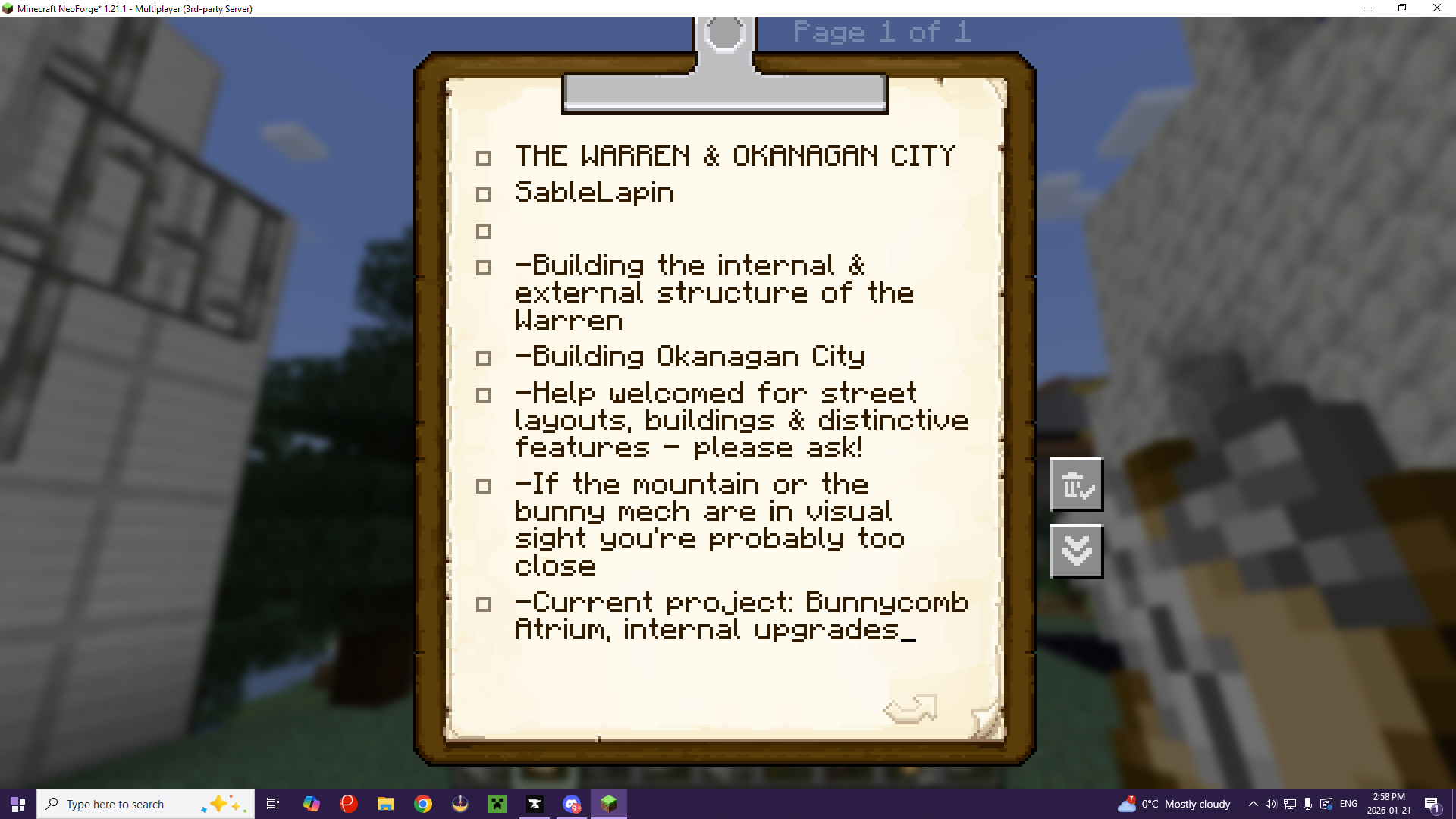
Project Notes for The Warren and Okanagan City in Minecraft, using the Create mod Clipboard by SA (Minecraft)
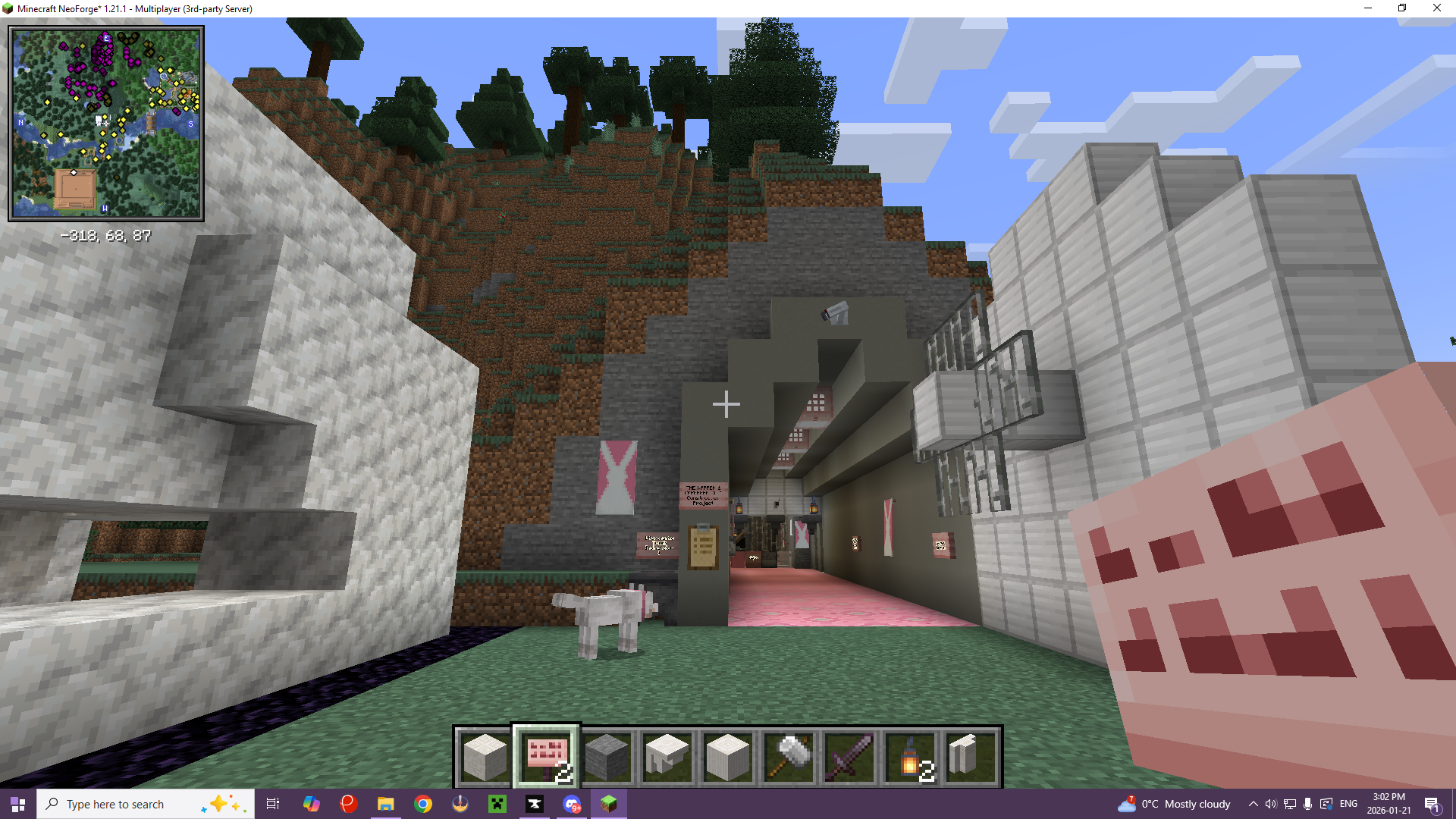
GoT Server - Warren Entrance, showing Project Notes location by SA (Minecraft)
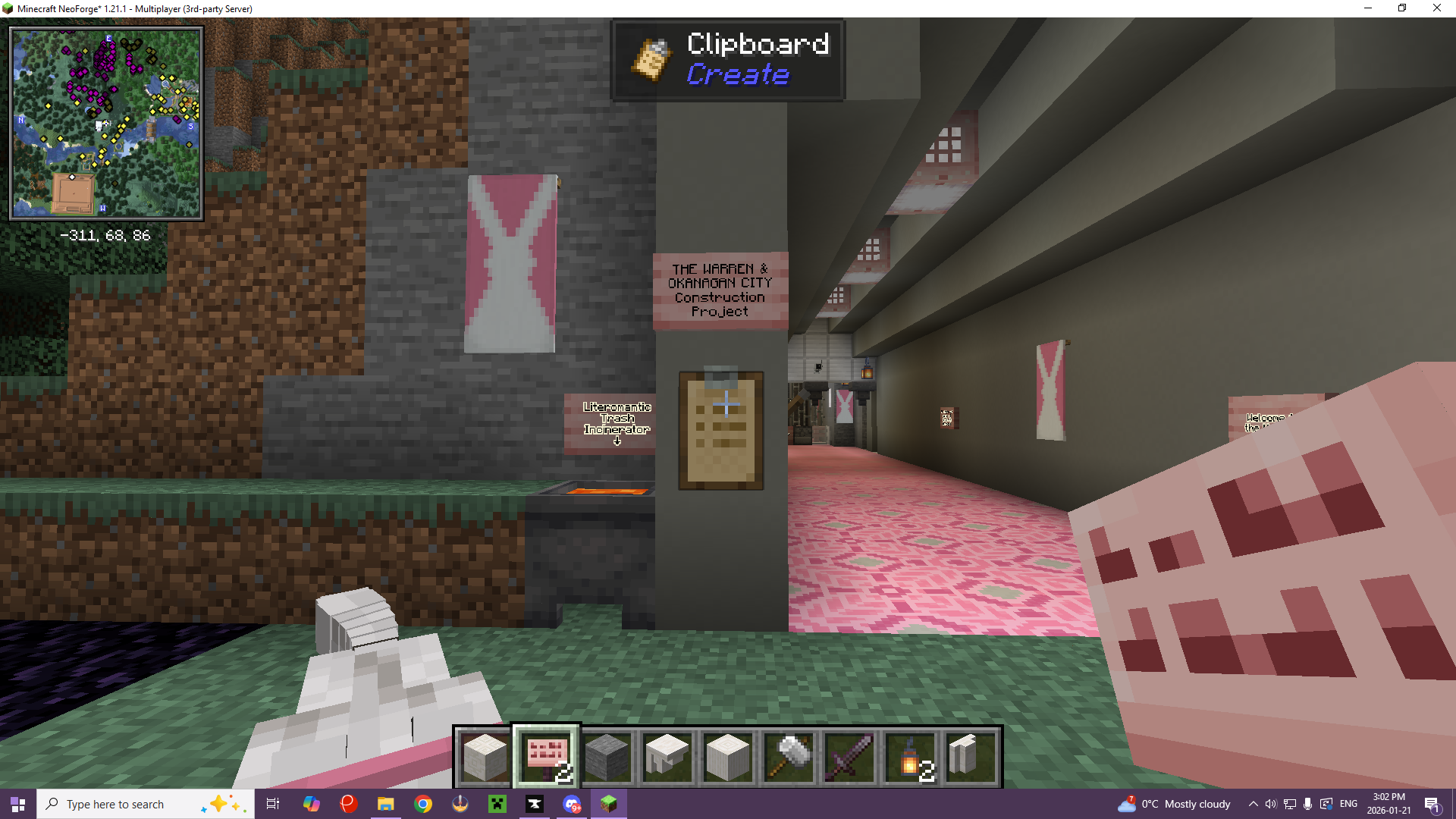
An example of Project Notes at the entrance of the Warren, showing sign and clipboard by SA (Minecraft)
As a personal request, if you are building a "canon location" in the GoTverse that has appeared in videos, please try to make it make sense in the context of the videos, and please try to make the location at least sort of look like the way it, or part of it, appeared in the video. (ie. There are four main backdrops that were used to represent different parts of the Great Library. I built all four within its structure with the intent to make those sections look like those backdrops, within reason. The same has been done at the Warren. A spot has also been picked out near Zafforza City for the Generator Warehouse from Fall of Mollusca 2023, in such a way that the tunnels that exit it actually do go to the locations and directions described.)
Beacons
Fully constructed beacons are a really useful tool in a world this size! That said, we don't want the whole landscape to be a forest of glowing lasers into the sky. Here are some general guidelines (not rules, because there's some wiggle room; if you're unsure, ask!) for the use of Beacons:Claiming Land and the Use of Sharestones
Several players have now begun scouting out places that suit canon locations associated with their Houses. If you choose to do the same, there are some general practices the players have developed to respect one another and avoid conflict.If you find a location you want to build on, first check and make sure you're not within visual sight of another claimed location. Preferably if someone is already building in that biome, you should find a similar biome elsewhere if you can. However, some biomes, such as the Crystaline Chasm (Nether) and Auroral Forest (Overworld) are extremely rare, and may have to be shared. Work that out with the person who has already claimed it if possible.
When you have decided to claim a location, first, lay down a Sharestone that is the "protected colour" of your House. You can always move it later if it interferes with your build project. It will ask you to name the location when you do so. Name it something that describes what you're going to build there (ie. The Warren, Canadian North, Penwall, Mesa Mitchell, etc.)
Then make sure to put up at least one banner of the group you're claiming the location for. You really can't use too many, because the point is to make it clearly visible. In other words, plant your flag!
Sharestones of a particular colour will connect to all other Sharestones of that colour, so if you're looking to build a "secret" location, talk to one of the Ops about your best options.
In general, Sharestones and Waystones represent our in-universe Portals, and should be placed where your Portals would be. However, in many cases, the addition of a Sharestone is mostly to make particular biomes easier to reach from other locations, since the world generation does not follow Earthly relative locations or logic. To simulate that, you may conceal your Sharestone. Just make sure to leave the blocks immediately surrounding it free, and make sure any coverings are at least 3 blocks high, so that players have room to materialize when they get there.
There are also a number of Gray Sharestones. These mark either collective assets of the world (ie. The Great Library, the Rainbow Forest,) or have been used to mark interesting biomes that others might want to explore and build in.
Thinking of Others
Often when players are scouting out locations for their own needs, they find locations along the way that make them think of other groups and Houses, or that they think might be useful to someone, if not them.If you find such a location and you want to share with a particular House (ie. say you found a willow grove and thought of Meles), lay down a Sharestone of the appropriate House colour (in this case, green) and name it something with a question mark (ie. "The Willows?") That way, they know it's a suggestion and they don't have to take it if they don't want to. They can always smash out the Sharestone later, or a Server Op can.
If you find a location you want to share with everybody, or offer up to anyone (say you found a really cool glacier) lay down a Gray Sharestone. Name it something descriptive when you set it (ie. "Glacier"). Then people will know it's up for grabs.
World Spawn is near the Great Library and there is a teleporter station in the basement of the Guard Tower there, with teleporters of multiple colours, including a Gray Sharestone. There is a similar setup in front of the Warren, which used to be the World Spawn, representing House Lapin's first public Transcontinental Portal. And there is also a similar setup at the edge of The Rainbow Forest (an archwood forest, which is a resource everyone will need for one of the magic mods.)
If you would also like to have your House build a public Transcontinental Portal, you may place Sharestones of all House colours wherever you are setting the Portal. We are also working on options to use some of the portals that are available through the magic mods.
Waystones vs. Sharestones
Waystones differ from Sharestones in that you must interact with them before you can teleport to them (teleporting from them appears to count as interaction.) However, they occasionally generate naturally in the world, while Sharestones do not. Sharestones, on the other hand, automatically give you access to all other Sharestones of that colour whenever you interact with one.The Great Library
The Server Ops have started building the Great Library. It is marked with Sharestones of all colours, and a Waystone at the top of the mountain, and is open to everyone, and will remain so.It is canon that the Library is bigger on the inside than it is on the outside. Anyone is welcome to build additions onto The Great Library, as long as you do not destroy anything that is already built, you build underground or into the mountain, and your creations are not visible from the outside. (It shouldn't be hard. I swear the hill is hollow!) I strongly encourage every House to participate so that the building really does become a place for everyone.
Other Dimensions
For obvious reasons, the Nether and the End represent The Void in the Game of Tomes server. However, this is impractical in the process of playing the Minecraft Survival game, because only Voiders may safely travel to the Void in GoT canon, and you need to travel to the Nether and the End in order to complete the game.A number of Nether and End biomes have been claimed to represent locations in the Void. Please avoid interacting with those locations (same rule - no building or mining within visual sight of the claimed location). However, some locations that have been claimed for the Void invite you to share with us, so please feel free to ask! Other Extradimensional biomes are up for grabs, and you may even find some connected to the Gray Sharestone network already. YES, it is possible to use Sharestones and Waystones between dimensions!
The End Dragon has already been defeated in this server, so the End biomes are also available. If you wish to fight the End Dragon, let the Ops know and we can summon it.
The End may also be used to simulate pocket dimensions if you wish to build one (although Overworld biomes can also be used for this purpose - for example, I have used a Deep Dark biome to simulate at least one Void location). If you wish to simulate a pocket dimension for Yeetspace storage, there is also a SecurityCraft feature that allows you to create a pocket dimensional room, and Sophisticated Backpacks essentially lets you make Backpacks of Holding.
Building Things That Are Not in the GoTverse
YES, you can build projects that are not intended to be part of the GoTverse, just for their own sake! And YES, you can experiment with builds! Just LABEL THEM CLEARLY if they're not intended to be part of the shared universe. Put up a big sign in a clearly visible location, like near the front door of a structure, or the gate of a city (I find the Create signs can work well for this).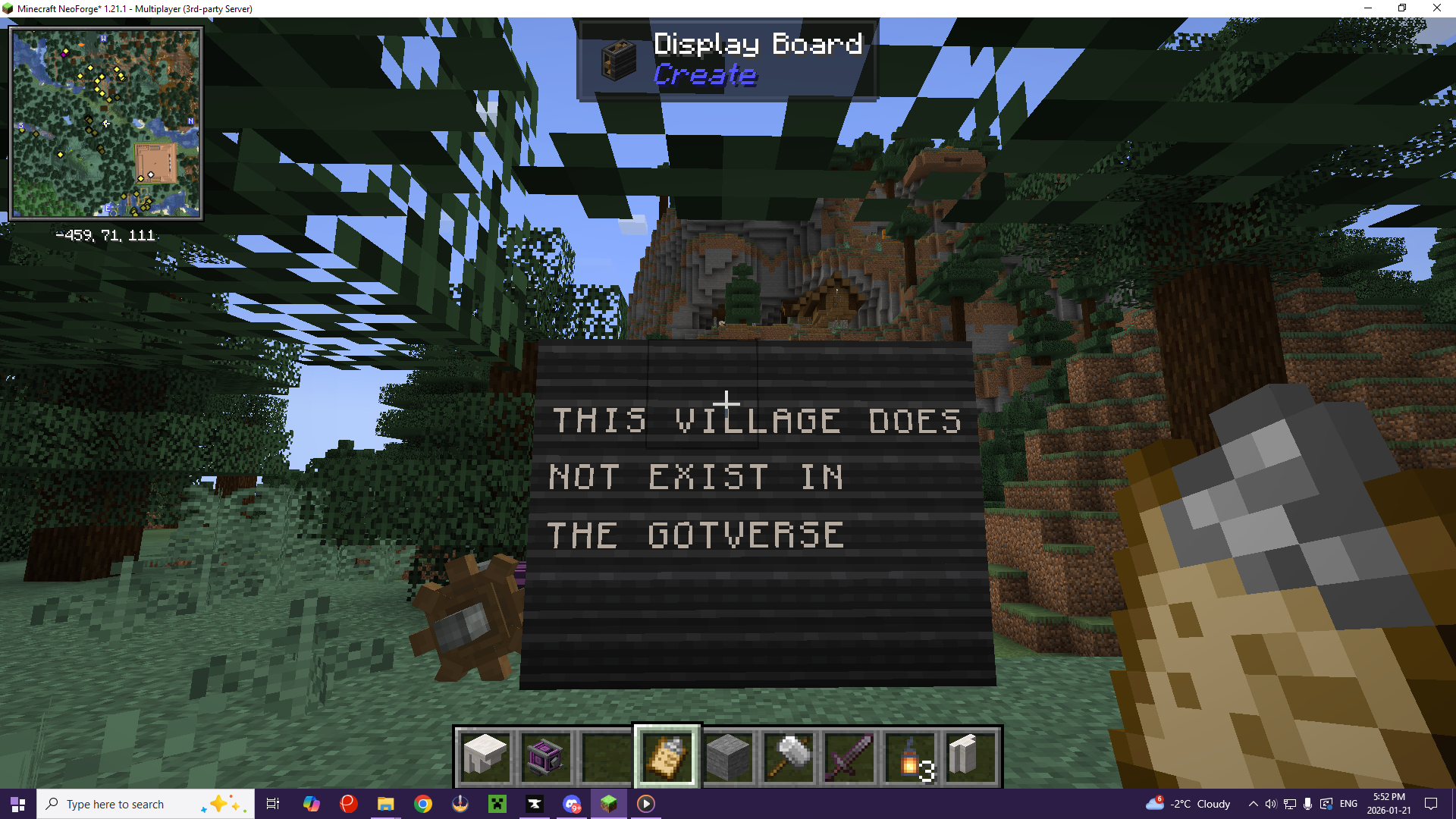
An example of a Create mod display board showing that this village does not exist by SA (Minecraft)
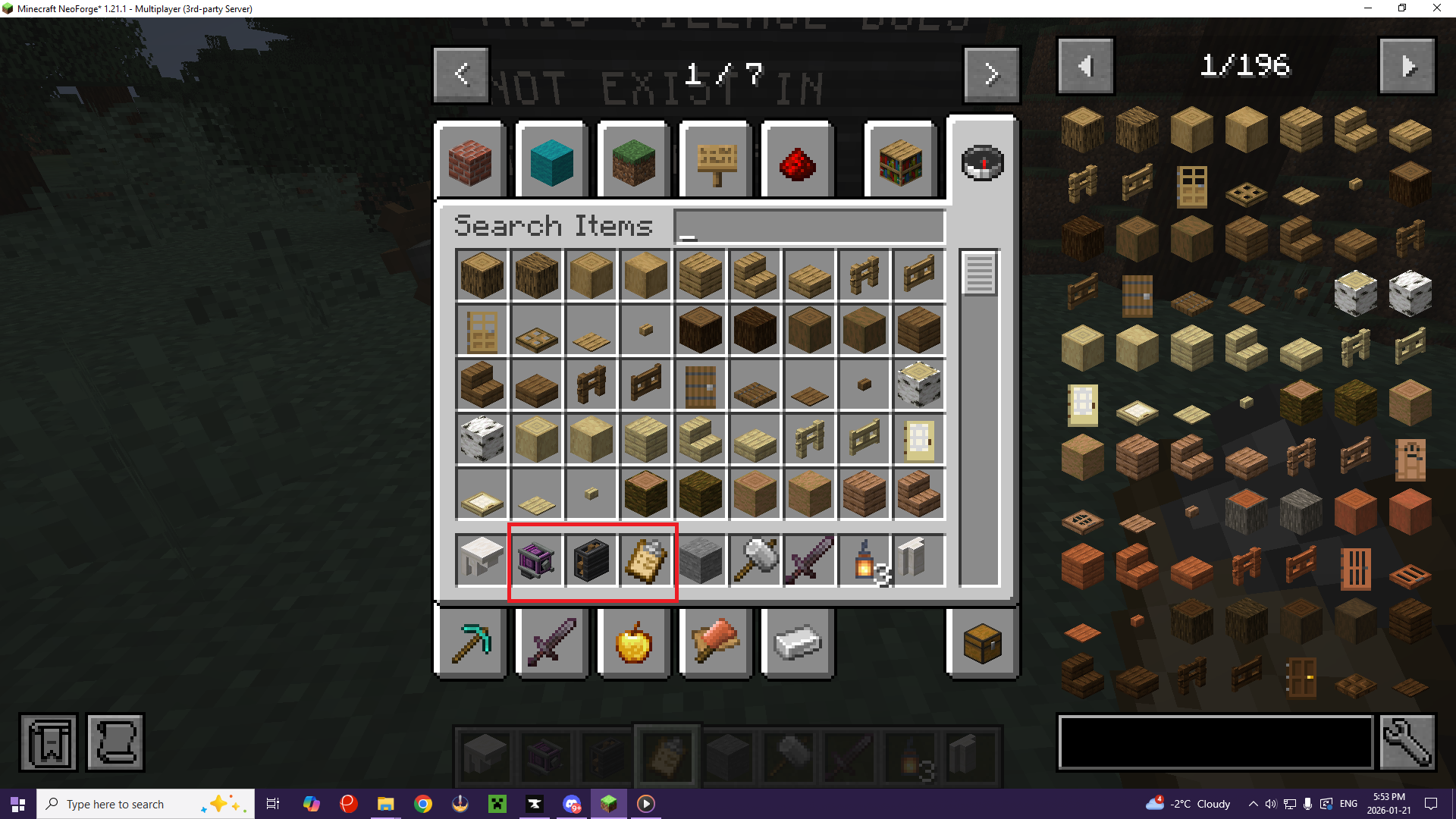
Examples of some of the things needed for the Display Board in the Create mod in inventory (you'll also need any cogwheel, and you can use any engine) by SA (Minecraft)
Roleplay Rules
Other Rules
These rules and Terms of Service are subject to updates at any time, and it is your responsibility to make sure you are aware of them.Failure to observe these rules may result in suspension of access, or banning from the server, as the Ops see fit, regardless of your Patreon Tier.
Above all, have fun, and make sure everyone else is having fun too!
WIP
Streamer
Missing
Status: Location Unknown
Deceased
Status: Deceased Character
Retired
Status: Retired Character or Article


Navigation
The Game of Tomes Minecraft Server is currently a perk available to Patreons at the $5+ Tiers.



Comments